Failure Triage Automation: From Issue Detection to Approved Fix
Overview
Failure triage is one of the most expensive parts of modern CI/CD. A failing pipeline can mean many different things: a real product bug, a broken test, stale data, an environment issue, a dependency outage, a flaky timing problem, or a missing requirement. Teams lose time when every failure requires a human to open logs, inspect screenshots, read traces, reproduce locally, find the owner, and decide what to do next.
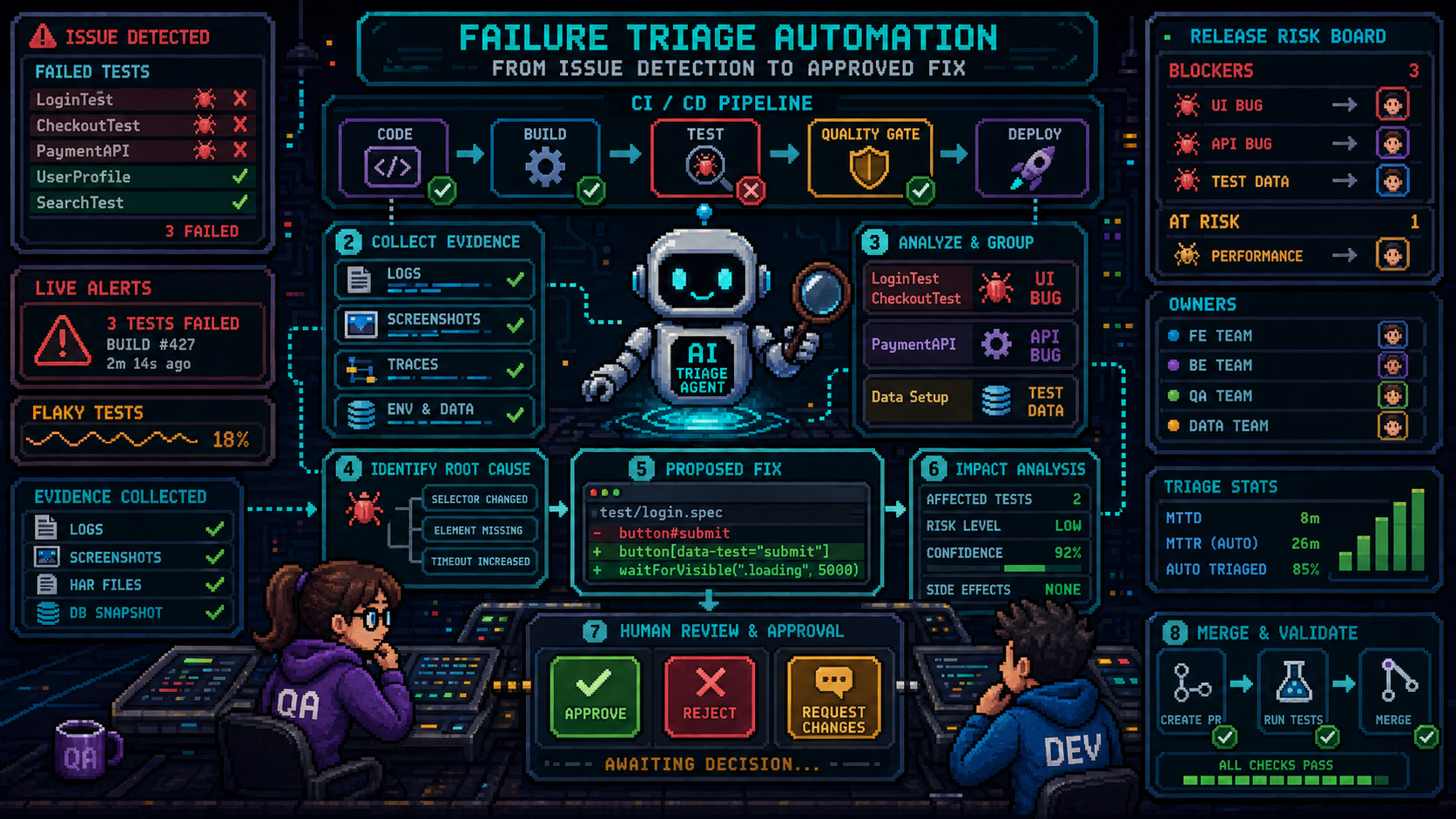
AI-assisted failure triage can automate much of this work. The pipeline can collect evidence, classify the failure, identify the likely root cause, propose a fix, validate that fix in an isolated run, and open a pull request or issue with the solution attached. The human should not receive only “something failed.” The human should receive “this failed, here is why, here is the proposed fix, here is the evidence, and here is the approval button.”
The key design principle is control. The system can automate investigation and draft remediation, but humans should approve meaningful changes. A triage agent should not silently weaken tests, skip checks, or change product behavior just to make the build green.
The Problem
CI failures are often noisy. One broken fixture can fail fifty tests. A slow environment can look like a product regression. A renamed UI label can break end-to-end tests even though the feature still works. A real defect can be hidden inside a large wall of unrelated red results.
Manual triage usually requires several steps:
- Open the failed CI run.
- Find the first meaningful failure.
- Inspect logs, screenshots, traces, videos, and API responses.
- Compare with recent commits.
- Check whether the test is flaky.
- Reproduce locally when possible.
- Decide whether the failure is product, test, data, environment, or unknown.
- Find the right owner.
- Create a bug or fix.
- Rerun tests and confirm the result.
This process is important, but much of it is repetitive. Automation can collect and organize the evidence before a person starts reviewing.
What Automated Failure Triage Should Do
A good triage system should answer five questions:
- What failed?
- Why did it likely fail?
- What evidence supports that conclusion?
- Who should own the next step?
- Is there a safe proposed fix?
The best output is not a generic AI summary. The best output is a structured triage package that includes evidence, confidence level, owner, risk, and next action.
Example output:
Failure: checkout-discount.spec.ts > applies expired coupon error
Likely cause: product regression
Confidence: high
Evidence:
- API response changed from 400 EXPIRED_COUPON to 200 DISCOUNT_APPLIED
- First failure appeared after commit a1b2c3
- Same test passed on main 2 hours earlier
Suggested action:
- Assign to Billing team
- Block release candidate
- Do not self-heal test
For a test-maintenance issue, the output may include a patch:
Failure: account-invite.spec.ts > sends viewer invite
Likely cause: locator changed
Confidence: medium
Evidence:
- Button role still exists
- Accessible name changed from "Send invite" to "Invite user"
- Screenshot confirms same dialog and same flow
Proposed fix:
- Update locator to getByRole('button', { name: 'Invite user' })
- Run affected Playwright test
Approval required:
- QA review for test intent
CI/CD Workflow
Automated failure triage should be built into the pipeline as a controlled workflow.
1. Detect the Failure
The pipeline starts when a test, build, lint check, deployment validation, smoke test, contract test, or monitoring check fails.
The system should capture:
- Test name.
- Suite name.
- Commit SHA.
- Branch.
- Pull request or deployment ID.
- Environment.
- Browser, device, service version, or region.
- Retry count.
- Historical pass and fail rate.
- Test owner.
- Feature owner.
- Risk label.
Without metadata, AI triage becomes guesswork.
2. Collect Evidence
The pipeline should attach all relevant artifacts before asking an agent to reason.
Useful artifacts include:
- Stack traces.
- Screenshots.
- Replay videos.
- Console logs.
- API responses.
- HAR files.
- Server logs.
- Test report JSON.
- Recent commits.
- Linked ticket or requirement.
- Related flaky-test history.
- Deployd version of all relament products.
Evidence collection should be deterministic. The agent should not need to guess where the logs are.
3. Classify the Failure
The triage agent should classify the failure into a small set of categories:
- Environment issue.
- Product bug.
- Test bug.
- Locator or UI maintenance.
- Test data issue.
- Dependency outage.
- Flaky timing.
- Requirement ambiguity.
- Unknown.
This classification decides whether the system can propose an automatic fix or should escalate to humans immediately.
4. Generate a Proposed Solution
For approved categories, the agent can propose a solution.
Examples:
- Update a locator to a stable role-based selector.
- Repair stale test fixtures.
- Regenerate isolated synthetic data.
- Update an API contract test after an approved schema change.
- Add a missing wait for a specific event, not a blind timeout.
- Create a bug with reproduction steps.
- Add a missing unit test that captures the defect.
- Add a rollback or feature-flag recommendation for release failures.
The solution should be reviewable. It should include a diff, not just a paragraph.
5. Validate the Proposed Fix
Before asking for approval, the system should run the smallest useful validation.
Validation can include:
- Re-run the failed test.
- Run related tests in the same suite.
- Run affected unit or API tests.
- Run lint or type checks for changed files.
- Compare before and after screenshots when relevant.
- Confirm no assertions were removed.
- Confirm no critical test was skipped.
The approval request should show whether validation passed.
6. Ask for Human Approval
The final step should be a human decision.
Depending on the change, approval may come from:
- QA for test intent, assertions, and risk coverage.
- Developer for code correctness and maintainability.
- Product owner for expected behavior changes.
- TPM for release impact and cross-team coordination.
- Security or compliance owner for sensitive flows.
The user experience should be simple: approve, reject, request changes, or escalate.
What the Human Should Receive
The reviewer should not receive raw noise. They should receive a concise package.
Example:
| Field | Example |
|---|---|
| Failure | checkout-discount.spec.ts failed |
| Category | Locator maintenance |
| Confidence | 86% |
| Risk | Medium |
| Proposed fix | Replace brittle CSS selector with role locator |
| Evidence | Screenshot, trace, DOM snapshot |
| Validation | Failed test passed, related checkout tests passed |
| Approval | QA approval required |
This changes the role of the human from investigator to reviewer.
Where Automated Fixes Are Safe
Some fixes are good candidates for agent-generated pull requests.
Safer candidates:
- Locator updates where the same element is clearly present.
- Test fixture repairs using approved test utilities.
- Synthetic data regeneration.
- Updating snapshots only after explicit review.
- Adding missing test metadata such as owner or tag.
- Improving failure messages.
- Adding a regression test for a confirmed bug.
- Opening an issue with evidence and reproduction steps.
These are still not always safe to merge automatically. But they are safe enough to propose.
Where Automation Must Stop
Some failures should not be auto-fixed.
Automation should stop when:
- A critical user journey fails.
- An assertion would need to change.
- The expected behavior is unclear.
- The fix would skip a test.
- The fix would remove coverage.
- The fix would change production code without a confirmed defect.
- The failure touches payment, identity, privacy, security, legal, or compliance flows.
- The agent cannot cite evidence.
- The confidence level is low.
In these cases, the system should escalate with evidence instead of trying to repair the pipeline.
Required Guardrails
Failure triage automation needs strict guardrails.
Recommended rules:
- Do not remove assertions automatically.
- Do not skip tests automatically.
- Do not lower severity automatically.
- Do not merge generated fixes without review.
- Do not change expected behavior without product confirmation.
- Do not use production data in generated fixtures.
- Do not hide flaky tests behind unlimited retries.
- Do not assign low confidence failures as resolved.
- Always include evidence links.
- Always record the final human decision.
These rules keep the system useful without making it dangerous.
Metrics
Measure the system by the quality of triage, not only by faster green builds.
Useful metrics:
- Mean time to classify failures.
- Mean time to propose a fix.
- Mean time to human approval.
- Percentage of failures correctly classified.
- Percentage of proposed fixes accepted.
- Percentage of proposed fixes rejected.
- Escaped defects related to auto-triaged failures.
- Flaky-test rate over time.
- Number of failures with missing owners.
- Number of repeated failures by root cause.
If approval speed improves and escaped defects do not increase, the system is helping. If the pipeline becomes greener while production defects rise, the automation is hiding risk.
Conclusion
Failure triage can be automated far beyond simple CI summaries. A mature pipeline can detect failures, collect evidence, classify root causes, propose solutions, validate proposed changes, and ask a human to approve the result.
The strongest model is not an agent that silently fixes everything. The strongest model is an agent that does the investigative work, prepares the solution, proves it with evidence, and gives QA, developers, or TPMs a clear decision to make.
In that model, humans spend less time searching through logs and more time making the decisions that still require judgment.